Apple Unveils $299 HomeView Smart Hub
A Centralized Command Center for the Modern Household
Apple has officially stepped into the consolidated smart home arena with the introduction of the HomeView, a $299 all-in-one hub unveiled in October 2026. Scheduled for a November 13 retail debut across several key international markets, the device merges the tactile familiarity of a tablet with the acoustic architecture of a HomePod, positioning itself as the definitive command center for contemporary living spaces. Rather than attempting to supplant personal computing devices like iPhones or iPads, Apple engineered the HomeView to operate seamlessly alongside them, functioning as a persistent, always-on interface for domestic management, multimedia entertainment, and family communication.
Hardware Architecture and Form Factor Options
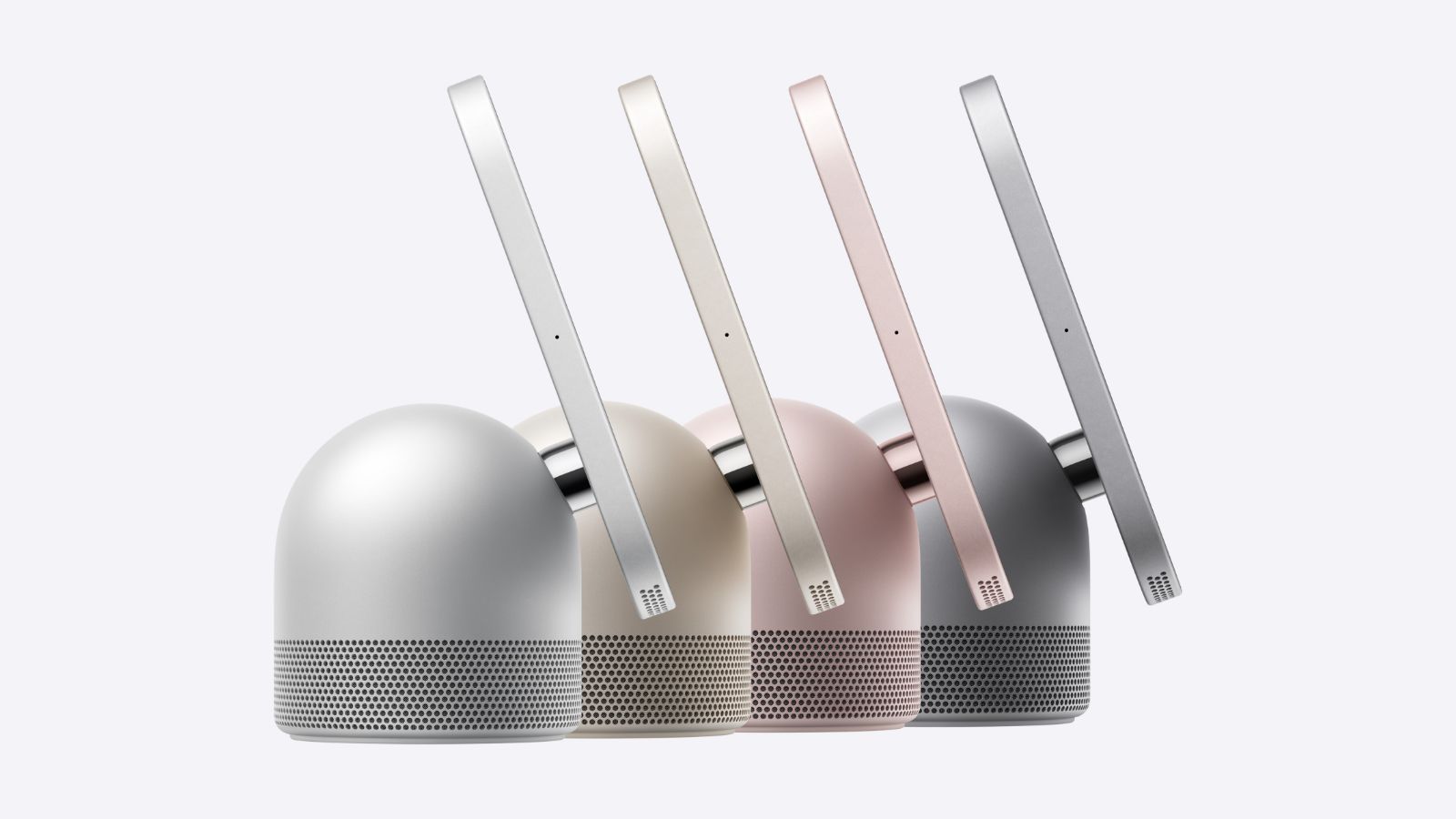
The chassis presents a distinctly compact footprint, measuring 5.73 inches square with a slender 9.8-millimeter profile. Apple provides two distinct configurations to accommodate varying interior design preferences and installation constraints. The primary model rests atop a dome-shaped acoustic base featuring perforated grilles along the lower band, elevating the screen between 5.38 and 6.82 inches depending on the selected tilt angle. This standalone unit weighs 2.1 pounds and ships in silver, starlight, rose pink, and space gray finishes. Conversely, the wall-mounted variant eliminates the speaker enclosure entirely, tipping the scales at merely 0.63 pounds and arriving exclusively in silver and space gray. Both iterations share identical internal silicon and sensor arrays but diverge in mounting logistics; the wall version necessitates third-party hardware and independent power sourcing, yet both models maintain an identical $299 retail valuation. A rear-facing USB-C port guarantees consistent charging standards, with the desktop model including a color-coordinated 1.5-meter cable and a 30W power adapter, while the wall configuration requires owners to procure compatible power delivery components separately.
Acoustic Engineering and Visual Precision
Sound reproduction remains a foundational pillar of Apple’s domestic strategy. Each HomeView integrates dual custom full-range drivers positioned beneath the display, augmented by Spatial Audio processing for immersive directional rendering. The desktop iteration adds a dedicated down-firing woofer paired with dual force-cancelling passive radiators housed within the base, delivering enriched low-end frequencies and expansive room coverage. Four strategically distributed microphones—front, rear, left, and right—enable reliable far-field voice capture even amid ambient noise. Computational audio algorithms continuously map the device’s physical placement to optimize frequency response dynamically. Consumers can also synchronize multiple units via AirPlay for cohesive whole-home audio distribution. On the visual front, the 7-inch Liquid Retina panel establishes a new standard for indoor illumination, offering an adaptive brightness spectrum spanning from 500 nits down to an unprecedented 0.3 nits, making it highly adaptable for nighttime environments where minimal light emission is critical. A front-facing 12-megapixel camera featuring an f/2.4 aperture manages video communications, utilizing Center Stage technology to automatically recalibrate framing based on participant movement or group composition, guaranteeing crisp low-light performance during evening interactions.
Interface Philosophy and Native Applications
Operating without a conventional app marketplace, the HomeView relies on a tightly curated suite of native applications and interactive widgets. Core utilities encompass Apple Music, Podcasts, Calendar, FaceTime, Safari, Alarms, Reminders, Find My, Home, Settings, Intercom, Weather, World Clock, Timers, and Messages. Extended media consumption reaches audiobooks, classical archives, news digests, and the Apple TV application, contingent upon authentication via a nearby iOS or iPadOS device. Cross-device continuity forms a central tenet of the user experience; tracks, podcasts, digital blueprints, and active conversations transfer fluidly between the hub and personal mobile devices. Safari integration transforms the screen into a practical kitchen companion, presenting sequential culinary instructions with a dedicated Start Cooking function that locks the interface for hands-free progression. During idle periods, the device adopts customizable display faces ranging from rotating photo galleries and real-time meteorological widgets to motion-reactive Flow animations and Snoopy-themed chronographs. The Home Modular face consolidates thermostat adjustments, lighting parameters, and scene automation into a unified dashboard, while the Home Camera face aggregates up to nine live security feeds simultaneously.
Artificial Intelligence, Biometrics, and Privacy Safeguards
Powering the entire ecosystem is Apple’s proprietary A18 processor, which drives localized Siri AI capabilities. While initial linguistic support remains confined to English, the architecture promises deeper contextual awareness once authenticated through a nearby smartphone or tablet. Data protection operates as a structural priority rather than an afterthought; facial recognition and vocal profiling execute entirely within the device’s Secure Enclave, guaranteeing that raw biometric and acoustic streams never traverse the operating system or reach Apple’s cloud infrastructure. The hub can distinguish up to six registered household members, dynamically tailoring personalized feeds, schedule entries, and message previews exclusively when the verified individual stands directly before the screen with a recently unlocked companion device connected to the identical local network. Unidentified visitors retain functional access to utility modules like smart home control, timer configuration, music streaming, and atmospheric checks, but remain permanently isolated from private data. Interaction activation occurs via wake-word triggers or a straightforward downward swipe gesture.
Network Infrastructure and Environmental Sensing
Communication protocols leverage Wi-Fi 6E, Thread mesh networking, and Bluetooth 6, reinforced by peer-to-peer discovery mechanisms for temporary guest connectivity. Integrated environmental monitoring encompasses accelerometers, photometric sensors, and precision thermohygrometers, facilitating automated climate adjustments and proximity-triggered information retrieval. Auditory detection subsystems can identify fire suppression alarms and carbon monoxide sirens, dispatching immediate safety alerts to linked accounts. To accelerate ecosystem adoption, Apple partnered with LG Electronics and Schneider Electric on the Apple Home Collection, unveiling premium, minimalist peripherals including video doorbells, indoor and outdoor surveillance cameras, electronic deadbolts, climate regulators, and temperature probes. These co-branded components will initiate shipments in December, with supplementary models arriving in early 2027. Legacy HomeKit and Matter-certified accessories maintain complete backward compatibility.
Commercial Strategy and Global Deployment Timeline
Positioned hierarchically above the newly refreshed $149 HomePod mini—which acquires Siri AI functionality but forfeits the visual interface—the HomeView targets consumers demanding a comprehensive, display-driven control node. System prerequisites mandate iOS 27.2 or iPadOS 27.2 minimum firmware, alongside uninterrupted broadband connectivity. Notably, European Union distribution encounters an initial postponement due to regulatory frameworks governing artificial intelligence operations. Pre-orders commence October 15 in Singapore, with South African buyers able to secure inventory immediately through authorized distributors. The official November 13 rollout spans the United States, United Kingdom, Canada, New Zealand, Australia, and India. Wall-mounted deployments require independent Schneider Electric hardware, including a $59.95 USB-C connector, a $79.95 hardwired AC installation kit necessitating licensed electrician oversight, and a pending $129.95 Power over Ethernet configuration scheduled for early 2027. All suspended setups demand a minimum 20W power delivery source and standard USB-C cabling. By converging acoustic excellence, visual clarity, and uncompromising on-device privacy, Apple’s latest domestic hub signals a definitive pivot toward intelligent, user-centric residential automation.
Source Reference (macrumors.com): Apple HomeView
Frequently Asked Questions (FAQ)
What operating system version is required to set up the Apple HomeView?
The device requires iOS 27.2 or iPadOS 27.2 or later, along with an active Wi-Fi connection, to initialize and function correctly.
Does the Apple HomeView include an App Store for downloading third-party software?
No. The device operates on a curated library of built-in Apple applications and widgets. Third-party audio and video integrations appear only after authenticating a nearby iPhone or iPad.
How does Apple handle privacy and facial recognition on the HomeView?
All facial and voice recognition processes occur locally within the device's Secure Enclave. Raw biometric data never leaves the hardware or accesses the operating system, ensuring household member information remains strictly separated and private.
Why is the Apple HomeView unavailable in the European Union at launch?
Initial EU availability is delayed due to regulatory compliance requirements surrounding the device's integrated Siri AI functionality, which will be addressed before regional distribution begins.
What mounting options and accessories are recommended for the wall-mounted HomeView?
The wall version requires separate mounting hardware and power delivery. Compatible Schneider Electric mounts include a <code>$59.95</code> USB-C connector, a <code>$79.95</code> hardwired AC kit, and a future <code>$129.95</code> PoE wired option, all requiring a minimum 20W power adapter.
{“@context”:”https://schema.org”,”@type”:”FAQPage”,”mainEntity”:[{“@type”:”Question”,”name”:”What operating system version is required to set up the Apple HomeView?”,”acceptedAnswer”:{“@type”:”Answer”,”text”:”The device requires iOS 27.2 or iPadOS 27.2 or later, along with an active Wi-Fi connection, to initialize and function correctly.”}},{“@type”:”Question”,”name”:”Does the Apple HomeView include an App Store for downloading third-party software?”,”acceptedAnswer”:{“@type”:”Answer”,”text”:”No. The device operates on a curated library of built-in Apple applications and widgets. Third-party audio and video integrations appear only after authenticating a nearby iPhone or iPad.”}},{“@type”:”Question”,”name”:”How does Apple handle privacy and facial recognition on the HomeView?”,”acceptedAnswer”:{“@type”:”Answer”,”text”:”All facial and voice recognition processes occur locally within the device’s Secure Enclave. Raw biometric data never leaves the hardware or accesses the operating system, ensuring household member information remains strictly separated and private.”}},{“@type”:”Question”,”name”:”Why is the Apple HomeView unavailable in the European Union at launch?”,”acceptedAnswer”:{“@type”:”Answer”,”text”:”Initial EU availability is delayed due to regulatory compliance requirements surrounding the device’s integrated Siri AI functionality, which will be addressed before regional distribution begins.”}},{“@type”:”Question”,”name”:”What mounting options and accessories are recommended for the wall-mounted HomeView?”,”acceptedAnswer”:{“@type”:”Answer”,”text”:”The wall version requires separate mounting hardware and power delivery. Compatible Schneider Electric mounts include a $59.95 USB-C connector, a $79.95 hardwired AC kit, and a future $129.95 PoE wired option, all requiring a minimum 20W power adapter.”}}]}